Fax Machine No Phone Line How To Send And Receive Faxes
Ditch the landline and still send that contract in minutes. There are four reliable no-line fax methods that fit different needs. Whether you’re at home, in the field, or tied to an old-school machine, one of these options will do the trick.
Quick Overview Of No Line Fax Options
- Browser-based web fax services let you drag, drop and hit send—no installs required.
- Email-to-fax gateways transform your inbox into a fax line with zero extra software.
- VoIP adapters link your router to a fax machine, blending old gear with modern networks.
- Scanner-plus-cloud apps convert scans into faxes in a single upload.
Below is a quick rundown of each approach, spotlighting where they shine.
Summary Of No Line Fax Methods
| Method | Key Benefit | Ideal Use Case |
|---|---|---|
| Web Fax | No hardware needed | Home office compliance |
| Email Fax | Seamless email workflow | Remote reporting |
| VoIP Adapter | Integrates old equipment | Legacy systems |
| Scan & Upload | True mobility | On-the-go faxing |
Each route solves a common fax challenge without tapping into a physical phone line. To explore the full step-by-step process, head over to our detailed guide to faxing.
Understanding How No Line Fax Works
Ever sent a fax without a phone jack? Modern solutions tap into VoIP protocols—T.38 and G.711—to translate those classic fax beeps into digital packets for smooth internet transport.
Translating Fax Tones Into Data
Cloud fax services lean on email APIs to route documents securely. They mimic the old handshake, chop the data into packets, then reassemble everything on the other side:
- Packetization splits your fax into RTP packets for reliable delivery.
- Handshake Emulation recreates the familiar CNG and CED tones.
- Reassembly stitches the packets back into the original scan.
Imagine firing off a PDF in London. It cruises through an encrypted tunnel and arrives in New York as a crisp printout in seconds.
Back in the day, fax machines reshaped office workflows. By 1988, businesses had over 10 million units, and early ’90s sales hit 20 million a year. Discover more history on Business.com
Key Takeaway: Knowing how VoIP and cloud faxing work helps you pick between a fully managed service or a DIY hardware setup—balancing speed, security, and budget.
Setting Up Web Fax With SendItFax
Getting Started With Your Account
When you sign up for SendItFax, the whole process takes just a few clicks. Verify your email, and you’re ready to roll—no hardware or phone lines necessary.
Next, pick a local or toll-free number that fits your business needs. Then upload your PDF and, if you like, slap on a branded cover page to make it look sharp.
Navigating The Dashboard
The SendItFax dashboard keeps everything in one place:
- Quick-Send buttons for one-off or batch faxes
- Real-time status updates from “Queued” to “Delivered”
- A complete history so you can track what went out and when
Everything is laid out clearly, so even first-time users can find their way around.
Key Takeaway: You can manage every fax—sent or received—right from your laptop, tablet, or smartphone.
Automating Routine Faxes
Imagine waking up to an inbox full of invoices already on their way to clients. With SendItFax’s scheduling feature, you can:
- Queue daily, weekly, or monthly invoice runs
- Set recurring cover pages with client logos
- Receive email alerts on failed deliveries
This kind of automation frees you from the daily grind and keeps cash flow steady.
Learn more in this guide on sending faxes online
Market Trends And Projections
Fax services aren’t disappearing—they’re evolving. Here’s a quick look at where the market stands:
| Year | Market Size (USD) |
|---|---|
| 2024 | $3.31 billion |
| 2030 | $4.47 billion |
That 5.15% CAGR underscores steady growth, driven largely by email-to-fax solutions in regulated industries.
Read the full research on market growth
Configuring Email To Fax And VoIP Fax Gateways
Setting Up Email-To-Fax Gateways
Turning your email into a fax machine only takes a few quick steps. First, plug in your SMTP credentials so the gateway can authenticate and relay messages on your behalf.
- Send your fax by addressing an email to [email protected], with the recipient’s number in the subject line.
- Attach your document as a PDF, Word file, or image.
- Watch for a confirmation email that tells you whether the fax went through or bounced back.
For instance, I often drag an invoice PDF into Outlook, type 9876543210 in the subject field, and hit send. A moment later, the gateway files a success—or failure—notice right in my inbox.
Integrating VoIP Fax Adapters
If you’ve still got a trusty fax machine, a VoIP adapter can breathe new life into it—no copper lines needed. Just connect an RJ11 cable from the adapter’s phone port to your fax machine and assign it a static IP on your network.
Flip on T.38 in the adapter settings to ensure reliable fax-over-IP transfers. Once that’s done, your legacy hardware behaves just like it’s hooked to a traditional phone line.
Combining email-to-fax with a VoIP adapter gives you the best of both worlds: modern convenience and tried-and-true hardware. And while standalone fax machines have seen lower sales, the overall market still hit $624 million in 2025—with service revenues climbing to $3.3 billion in 2024. Dive deeper into these trends in this market report.
Comparing No Line Fax Methods
Finding the right way to fax without a landline comes down to balancing cost, setup time, security, and your team’s workflow. What works for a small startup may not suit a busy law firm or a mobile repair crew.
Why These Four Approaches Stand Out
-
Web-Based Fax Services
Instant onboarding—often under five-minute—with no extra hardware. -
Email-to-Fax Gateways
Send a standard email, and the gateway converts it to a fax. Simplicity itself. -
VoIP Adapters
Keep your existing fax machine; just plug in a small adapter. Setup takes about 30-minute. -
Scanning & Uploading
Perfect for field teams: scan documents onsite and upload through a browser or mobile app.
Visual Roadmap To Your Choice
The graphic below walks you through each option with clear icons and decision paths. You’ll see which method wins on speed, which one on ease, and where adapters or scanners really shine.
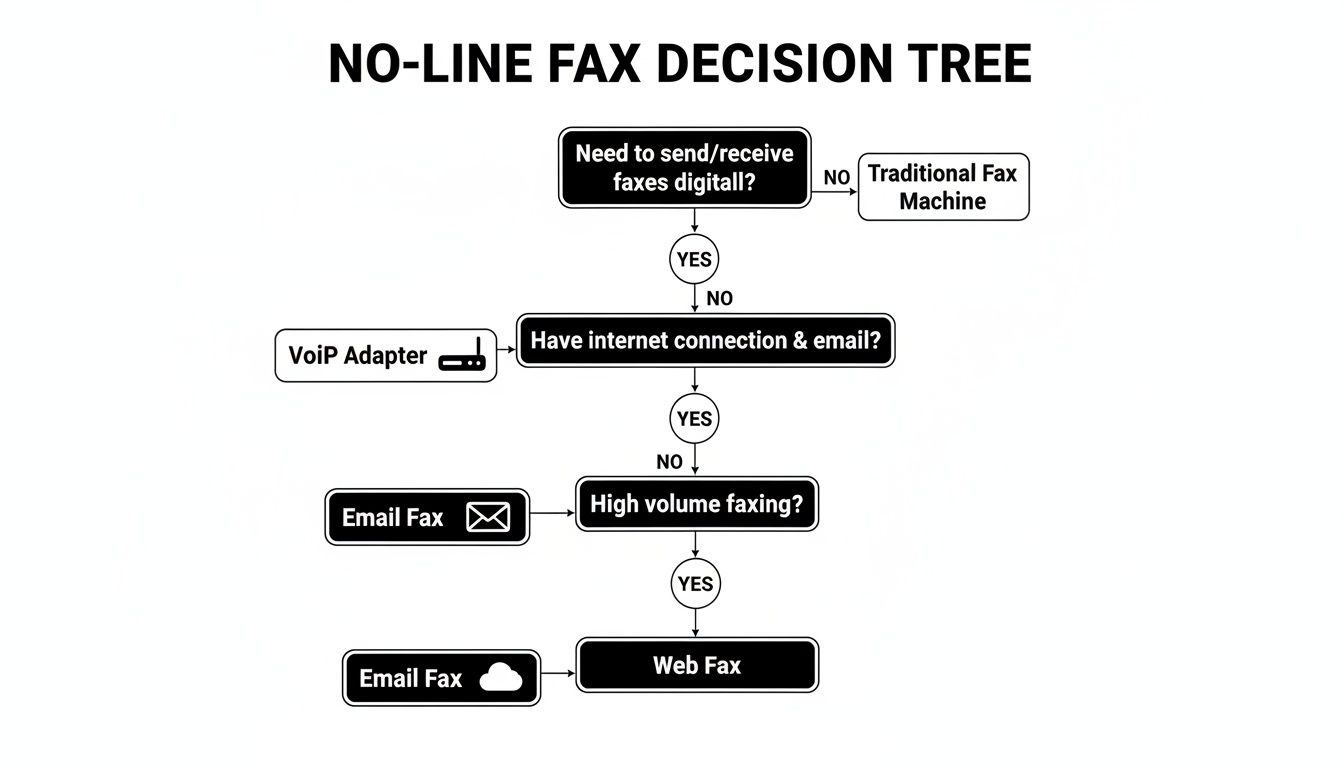
Web fax is unbeatable for rapid deployment. Email gateways keep things low-friction. Adapters let you hang on to legacy hardware. Scanning gives you true on-the-move flexibility.
Comparison Of No Line Fax Techniques
Below is an at-a-glance comparison of setup complexity, ongoing costs, and security levels:
Comparison of No Line Fax Techniques
| Technique | Setup Complexity | Monthly Cost | Security Level |
|---|---|---|---|
| Web-Based Fax | Low (5-minute) | Moderate | High (TLS/AES encryption) |
| Email-to-Fax Gateway | Very Low | Low | Medium (SSL/TLS) |
| VoIP Adapter | Medium (30-minute) | One-Time Fee | Variable (provider-dependent) |
| Scanning & Upload | Low | Free–Low | Medium (password-protected) |
This snapshot helps you match each method to your priorities—whether speed, budget or compliance.
Next Steps And Further Reading
Think about how many faxes you send monthly, your security requirements, and any existing fax hardware you want to keep. For a deeper dive into online fax service options, explore our guide on online fax services comparison.
With these insights in hand, you can confidently ditch the phone line and keep those documents flowing.
Troubleshooting No-Line Fax Issues

Fixing Web Fax Portal Hiccups
When your online fax portal hangs on a spinning icon or times out, a quick cache clear often brings it back to life.
Next, ensure your network isn’t blocking essential traffic by confirming ports 80 and 443 are open.
Handling Email-To-Fax Rejections
Sometimes SMTP servers reject attachments because of format mismatches.
Dig into your mail logs to spot the bounce codes, then switch your documents to PDF or TIFF—that single change usually stops the failures.
Improving VoIP Fax Quality
Faxing over VoIP can hit snags if jitter spikes or packets get dropped.
Flip on T.38 support in your phone system and give UDP traffic top priority in your router’s QoS settings. This combo slashes handshake errors.
Fine-Tuning Document Settings
Upload glitches often crop up when resolution is too high or color formats get messy.
Dial your dpi back to 200 and stick with black-and-white TIFF files—this simple tweak fixes most upload hiccups.
Quick Fix Summary
Clear browser cache; verify ports 80/443; convert attachments to PDF/TIFF; enable T.38 & prioritize UDP; set dpi to 200.
Frequently Asked Questions
-
How Can I Send Faxes Without A Traditional Phone Line?
You don’t need copper wires anymore. I often point people toward a web-fax service, but you can also set up email-to-fax gateways, attach a VoIP adapter, or simply scan your docs and upload them directly. -
Will I Lose My Existing Fax Number?
Absolutely not. You can port your current number in just a few days—no need to update everyone in your address book. -
Are These Methods Really Secure?
Yes. Go for solutions that support TLS, offer end-to-end encryption, or even provide an air-gap option if you’re handling highly sensitive files. -
What If My Internet Connection Drops?
It happens. The best services let you queue outbound faxes until you’re back online, or you can switch over to a mobile hotspot and keep your documents moving.
Ready to drop that old landline? Give SendItFax a try—no extra hardware required.
Related Posts

How to Fax from Computer Mac: Free Online Method

Do You Need a Fax Number to Send a Fax? a Practical Guide
