The Best Cheap Online Fax Service A Complete Guide
It might feel like faxing went out with dial-up internet, but for many industries, it's still the go-to for secure, legally sound documents. Think healthcare, law, and finance—they rely on it daily. A cheap online fax service is the modern answer, giving you the ironclad security of a traditional fax without the clunky machine hogging corner space.
Why Online Faxing Is Still a Smart Business Move
Too many businesses write off faxing as a relic of the past, but making the switch to a digital service is actually a sharp strategic move. It tightens up security and slashes costs. Think about the old way: you had the machine, a dedicated phone line, endless paper and toner, plus maintenance calls. An online service gets rid of all that, turning a clunky capital expense into a small, predictable monthly bill.
But this isn't just about the bottom line. It's about weaving a highly secure communication method into the way we work today. You can send or receive a critical document from anywhere, whether you're on a laptop, tablet, or your phone. For remote teams or anyone who isn't chained to a desk, that kind of flexibility is a game-changer.
The Growing Market for Digital Faxing
The numbers don't lie—the move away from hardware is massive. The global online fax service market was valued at an impressive USD 2,113.7 million in 2024 and is on track to hit USD 4,500 million by 2035. That's fueled by a steady compound annual growth rate (CAGR) of 7.1%.
This growth highlights just how much people value affordable services that can cut costs by up to 90% compared to the old way. You can dig deeper into these online fax market trends to see the full financial picture.
The real magic of online faxing is how it blends old-school, proven security with new-school digital efficiency. It offers a verifiable, point-to-point delivery that many email systems just can't match, which is absolutely vital for staying compliant in regulated fields.
Key Benefits of an Online Fax Service
Making the switch brings a handful of immediate, tangible benefits that will change how your business manages important documents.
- Enhanced Security: Digital fax services encrypt documents in transit. That's a world of difference from a sensitive paper fax left sitting in a shared office printer tray for anyone to see.
- Cost Efficiency: When you ditch the machine, the dedicated phone line, and the endless supplies, you cut a significant chunk out of your overhead costs.
- Improved Accessibility: Faxes arrive right in your email inbox or a dedicated app. Sending one is just as easy, creating a workflow that's built for how we work now—on the go.
- Digital Organization: Every fax you receive is a digital file, like a PDF. This makes it incredibly simple to store, archive, and find what you need later without digging through filing cabinets.
Finding the Best Cheap Online Fax Service for You
Picking a cheap online fax service isn't just about finding the lowest monthly price. To get the right fit, you have to look under the hood at the details that will actually impact your work. We're going to break down exactly what to look for when comparing the top contenders.
This guide puts our own SendItFax head-to-head with established players like eFax, RingCentral, and Fax.Plus. Each one tackles online faxing differently—some are simple pay-as-you-go tools, while others offer subscriptions packed with features for businesses that fax a lot. Our goal is to hand you a clear, honest map to help you choose.
What Really Matters in a Low-Cost Fax Service
When you're comparing services, there are four key areas that will make or break your experience. These are the factors that directly affect your wallet, your workflow, and the security of your documents.
-
How They Charge You: Don't just look at the monthly fee. We'll dig into the real costs, including what happens if you go over your page limit, the rates for sending faxes overseas, and whether you can truly pay per fax instead of being locked into a subscription.
-
Your Page Allowance: This is a big one. Knowing exactly how many pages you get each month—and whether that's a combined pool for sending and receiving or separate limits—is the key to avoiding unexpected bills.
-
Security & Compliance: For many professionals, this is everything. If you handle sensitive information, features like HIPAA compliance and strong encryption aren't just nice to have; they're dealbreakers. We’ll see which services meet these critical standards.
-
Faxing on the Go: The days of being chained to a desk are over. The ability to send a fax from your phone or tablet is crucial. We’ll look at how well each service's mobile apps and web platforms actually work in the real world.
The best value isn't always the lowest price. It’s about finding the service that lines up perfectly with how you work. A solo lawyer sending one contract a month has completely different needs than a small clinic that handles patient records all day long.
The need for secure, reliable faxing is huge, especially in regulated industries. The entire fax services market is valued at an impressive USD 3.31 billion in 2024. Online faxing makes up a whopping 65% of that, mainly because of security features like HIPAA compliance.
Small businesses in fields like healthcare and insurance are set to drive more than USD 200 million in market growth by 2030. They're often choosing online plans to avoid the hefty $5,000+ upfront cost of traditional fax hardware. For a deeper dive, you can check out the full fax market analysis. This just goes to show that picking a provider is a serious business decision, not just a minor monthly expense.
A Detailed Comparison of Pricing and Features
When you’re looking for a cheap online fax service, the price tag is really just the start. The real value comes from understanding the whole picture—from the monthly fees and page limits to the security protocols that keep your documents safe. Let's break down how the leading services actually stack up on the features that matter most to your wallet and your workflow.
The cost difference between old-school faxing and online services is staggering, and it's completely changing the market. We're seeing projections that the global online fax industry will climb to USD 4.54 billion by 2033, all thanks to these new, affordable options. Think about it: traditional faxing can run you $0.10-$0.50 per page, not even counting the machine itself. Online plans, on the other hand, average about $0.01 per page or come with flat fees under $5/month. This shift has already pulled in 75% of new SME users and pushed a 70% market migration to cloud-based faxing. You can see more on this trend in these detailed market reports.
Decoding Pricing Structures and Hidden Fees
The biggest difference you'll find between services is how they charge you. It usually boils down to two main approaches: monthly subscriptions or a pay-as-you-go model.
-
Monthly Subscriptions: Services like eFax or RingCentral offer tiered plans that give you a certain number of pages each month. These are great if your business faxes a consistent, predictable amount. The catch? You have to watch out for overage fees. The cost per page after you hit your monthly limit can sting, and those fees add up fast.
-
Pay-As-You-Go: This is where a service like SendItFax flips the script. By getting rid of monthly fees altogether, it becomes the most budget-friendly option for freelancers, small businesses, or anyone who only sends a fax every now and then. You just pay for what you use, so you're not throwing money away on unused pages during a slow month.
Don't forget to check the international rates, either. A service might look like a bargain for faxes sent across town, but the cost to send documents overseas can be wildly different from one provider to the next. If you have global clients, always look at their international rate sheet before you sign up.
Page Limits: Pooled vs. Separate Allotments
It’s also crucial to understand how a service counts your pages. Some providers offer a pooled page limit, which means your monthly total can be used for both sending and receiving. For instance, a 300-page plan lets you send 200 pages and receive 100, or any other mix that adds up.
Other services have separate send/receive allotments, which is a lot less flexible. A plan might give you 150 pages for sending and another 150 for receiving. If you send a ton of faxes but rarely get any back, you'll end up paying for a receiving limit you don't even touch.
With a pay-as-you-go model like SendItFax’s “Almost Free” plan, all that confusion disappears. It charges a flat $1.99 for up to 25 pages, giving you a simple, straightforward alternative without having to track monthly page counts. It's perfect for those urgent, one-off faxes.
Security and Compliance: The Non-Negotiables
For anyone in healthcare, law, or finance, security isn't just a nice-to-have feature—it’s a legal necessity. When you're comparing services, make sure you see strong encryption standards like TLS (Transport Layer Security), which protects your data while it's in transit.
Just as important is compliance with major regulations:
- HIPAA (Health Insurance Portability and Accountability Act): This is essential for any organization that handles protected health information (PHI). A truly compliant provider will offer to sign a Business Associate Agreement (BAA).
- GLBA (Gramm-Leach-Bliley Act): A must-have for financial institutions that need to protect their customers' private financial information.
While plenty of subscription services have HIPAA-compliant tiers (usually for a higher price), a simple and secure service is often all you need for less regulated tasks. For a full rundown, our online fax services comparison dives deeper into which providers meet specific compliance standards.
Usability and Platform Support
At the end of the day, a cheap online fax service is only good if it’s actually easy to use. The best platforms have clean, intuitive web interfaces and solid mobile apps for sending faxes on the go. Also, check if a service supports "email-to-fax," which lets you send a fax right from your email client—a feature that can really simplify your workflow. Browser support is key, too, so you can be sure your documents will send correctly whether you're using Chrome, Safari, or Firefox.
Choosing the Right Service for Your Needs
Picking a cheap online fax service isn't about finding a single "best" option. It's really about figuring out what you actually need. Your workflow, how often you send faxes, and your professional standards will all point you toward the right tool for the job.
Think about it: a freelance graphic designer who faxes a signed contract once a quarter has totally different needs than a busy medical practice. The designer just needs a quick, no-fuss way to send a document and be done with it. A pay-as-you-go service is perfect—no monthly fees for a tool they barely touch.
Matching Services to Real-World Scenarios
Now, picture a small legal office. They're constantly dealing with time-sensitive documents—court filings, client agreements, you name it. For them, a subscription plan with a high page count and serious security features like end-to-end encryption isn't a luxury; it's a necessity for keeping things efficient and confidential.
Or what about a real estate agent? They're always on the go, needing to fire off offers from their phone between house showings. A service with a slick, powerful mobile app is their top priority. The ability to scan, sign, and send from anywhere, without ever opening a laptop, is what makes or breaks a service for them.
This decision tree can help you map out your own needs based on a few key questions.
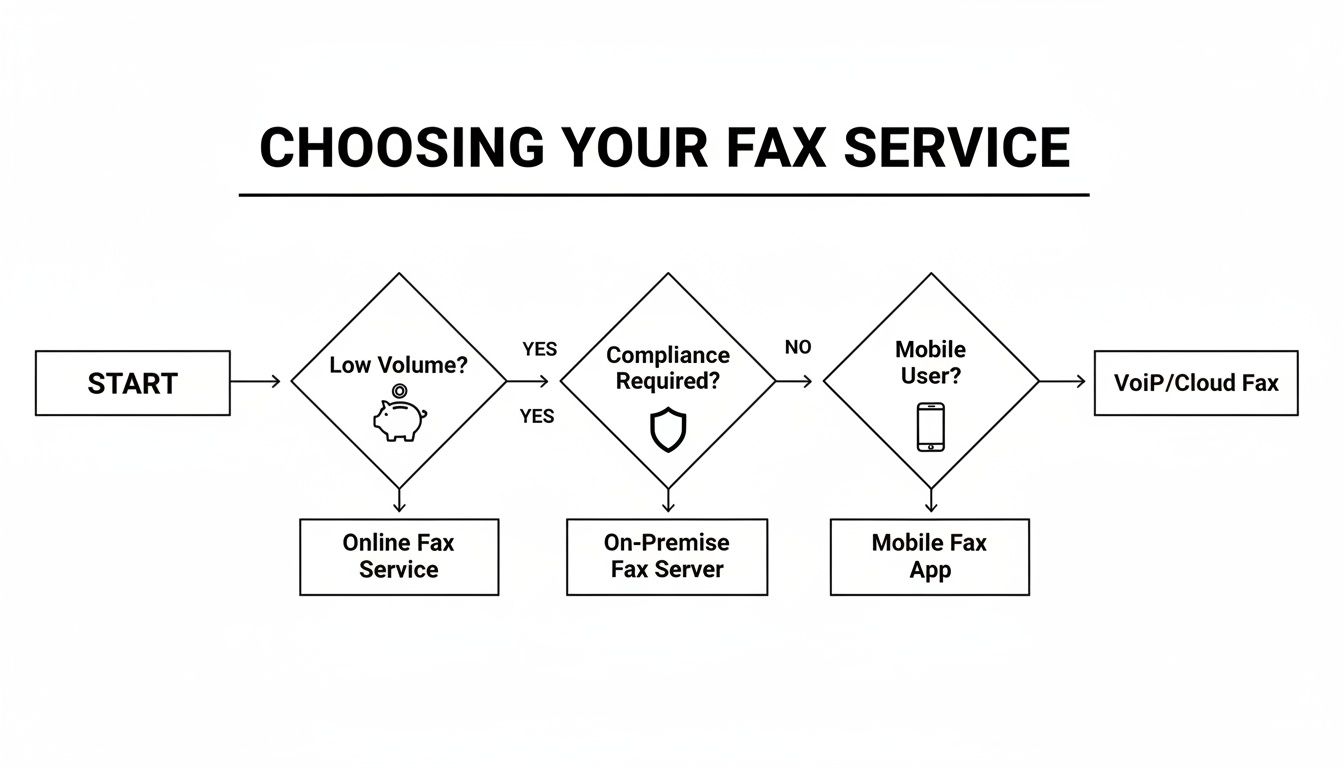
As you can see, it really boils down to how much you fax, what kind of compliance you need, and whether you need to send things from your phone.
When to Choose Pay-As-You-Go vs. a Subscription
A pay-as-you-go service like SendItFax shines for people who only send faxes sporadically. If you send a fax just a few times a year, why get locked into a monthly subscription? It just doesn't add up. You get all the modern convenience without the recurring bill.
But once you start sending faxes consistently, a monthly subscription often becomes the smarter financial move. A small business sending over 100 pages a month will almost certainly get a better per-page rate with a basic plan compared to paying for each fax one by one.
The critical tipping point is consistency. If faxing is an irregular task, a no-commitment service saves money. If it's a routine part of your business operations, a subscription provides better long-term value and often includes a dedicated fax number.
For anyone in a regulated field like healthcare or finance, compliance often makes the decision for you. A medical clinic that needs to be HIPAA compliant absolutely must pick a service that offers a Business Associate Agreement (BAA). These are typically only found in premium subscription tiers, making it a required business expense.
Understanding what a fax number is and whether you need your own dedicated one will also shape your choice. If you just take a moment to look at your specific situation, you'll find the most practical and affordable tool for the job.
How to Send an Online Fax in Minutes
Sometimes you just need to send one fax, right now. You don't want to sign up for a monthly plan or wade through complicated pricing tiers. That's where a pay-as-you-go service shines.
Using a platform like SendItFax, you can fire off a secure fax straight from your web browser in just a few clicks. It's the ideal choice when you need a cheap online fax service without the long-term commitment. The whole process is built to be quick and painless.
First, just pull up the website. No software to download, no accounts to create. You’ll simply pop in the recipient's fax number and your own email address so you can get the confirmation report. This immediate, no-fuss access is what makes these one-off services so useful.
Next, you just need to attach your document. You can easily upload common files like a PDF, DOC, or DOCX right from your computer.
Preparing and Sending Your Document
Once your file is loaded, you can add a custom message to the cover page. This is really handy for adding a reference number or just a quick note for the person on the other end. If you don't need a cover page, you can skip it altogether for a more direct send—a nice touch often found in paid, one-time services.
The SendItFax homepage lays all of this out for you, nice and simple.
As you can see, it's a straightforward portal where you enter the sender and receiver details and attach your files. No guesswork involved.
With your document attached and cover page ready (or skipped), you’re ready to go. Just hit the send button. For an even more detailed walkthrough, our guide on how to send a fax online has some extra tips.
The real beauty of a no-commitment service is its simplicity. You don't have to analyze pricing plans, count pages, or worry about a surprise recurring bill for a tool you might only use once or twice a year.
Finally, you’ll get a confirmation email as soon as the fax is successfully delivered. This email is your proof of delivery, giving you peace of mind that your important document made it to its destination securely and on time.
Your Final Decision-Making Checklist
Picking the right cheap online fax service really just comes down to what you actually need. Instead of getting lost trying to find the single "best" provider, it's better to ask yourself a few direct questions. This will help you pinpoint the perfect fit for how you work and what you want to spend.
This quick checklist will help you cut through the noise and make a confident choice.
First thing's first: think about how often you'll be sending faxes. Is this a daily or weekly task, or just something you do a handful of times a year? Your answer here is probably the biggest factor in finding a truly cost-effective solution.
Key Questions to Guide Your Choice
-
How many pages do you send each month? If you're a very light user—sending fewer than five faxes a month—a simple pay-as-you-go service like SendItFax is tough to beat. But, if you find yourself consistently sending more than that, a subscription plan with a monthly page allowance will almost certainly give you a better per-page rate.
-
Is having your own dedicated fax number a must? If you’re only ever sending documents out, a dedicated number is just an extra cost you don’t need. On the other hand, if you need clients, patients, or partners to send faxes to you, a subscription service that provides a permanent number is your only real option.
-
Do you need to be HIPAA compliant? This one is non-negotiable for anyone handling protected health information (PHI). If that's you, you absolutely must choose a service that will sign a Business Associate Agreement (BAA). This is almost always a feature reserved for paid, premium subscription plans.
It all boils down to a balance between frequency, features, and compliance. A freelancer who just needs to send one contract will get the most value from a no-commitment, pay-per-fax model. A busy medical office, however, needs the security, consistency, and reliability that only a dedicated subscription can offer.
By answering these questions for yourself, you can ignore the marketing hype and lock in on a service that truly fits your day-to-day operations and budget. This way, you get all the features you need without wasting money on extras you'll never touch.
Frequently Asked Questions About Online Fax Services
Jumping from a clunky machine to an online service can feel like a big leap, and it’s smart to have questions. You might be wondering about security, what happens to your old phone line, and how it all actually works. Let's clear up some of the most common questions people have when they switch to a low-cost online fax service.
Is Online Faxing More Secure Than a Traditional Fax Machine?
Yes, by a long shot. Think about the old way: a fax comes in and prints out, sitting on a shared machine in the open for anyone to see. That’s a huge privacy risk, especially for sensitive documents.
Online fax services change the game by encrypting your documents from end to end, just like a secure banking website. Your faxes arrive safely in your email inbox or a password-protected online account. This means no more prying eyes and no risk of someone accidentally picking up your confidential papers.
Do I Still Need a Phone Line for Online Faxing?
Nope, you can ditch that dedicated phone line for good. This is one of the best perks of going digital. Instead of relying on an old-school telephone connection, a cheap online fax service sends and receives faxes over your existing internet connection.
Getting rid of that extra phone line can immediately save you $20–$50 per month. Plus, you’re no longer tethered to a physical machine in an office.
The real power of modern faxing lies in cutting the cord from outdated hardware. Using the internet gives you better security and the freedom to fax from anywhere, all while keeping the legal weight of a traditional fax.
How Does Receiving an Online Fax Work?
It’s surprisingly simple. When someone sends a document to your online fax number, the service acts as a digital converter. It takes the incoming fax and instantly turns it into a PDF file.
That PDF is then sent straight to your email as an attachment. From there, you can open it, save it to your computer, or print it out just like you would with any other email attachment. It's incredibly straightforward.
Can I Easily Send a Fax From My Phone?
Absolutely. This is where the convenience really shines. Most modern online fax services are built with mobile users in mind, letting you send faxes directly from your smartphone or tablet.
You can snap a picture of a document, or just upload a file from your phone’s storage or a cloud service like Google Drive or Dropbox. It's perfect for when you need to send a signed contract or an urgent form while you're on the go.
Ready to send a fax in minutes without a subscription? Try SendItFax for a simple, pay-as-you-go solution. Visit https://senditfax.com to get started now.
Related Posts

How to Fax from Computer Mac: Free Online Method

Do You Need a Fax Number to Send a Fax? a Practical Guide
