A Modern Guide to Faxing Without a Fax Machine
It might seem like a throwback, but faxing is far from dead. What is dead is the clunky, noisy machine that used to sit in the corner of every office. These days, you can send legally binding documents like contracts and medical forms right from your computer or phone using online fax services, email-to-fax platforms, and mobile apps.
It's a far more convenient and secure way to handle things than relying on outdated hardware.
Why Faxing Without a Machine Is Now Standard Practice
Ever been in that spot where you urgently need to send a signed contract, only to realize you haven't seen an actual fax machine in over a decade? You're definitely not alone. The machine itself has become a relic, but the need for faxing persists, especially where security and legal proof are non-negotiable.
Sectors like healthcare, law, and real estate still count on faxing. Why? Because it offers a secure, point-to-point way to transmit sensitive information. Unlike a standard email that can be intercepted or disputed, a fax transmission receipt is often considered solid legal proof.
The Shift to Digital Solutions
This gap—the need for faxing without the ancient hardware—paved the way for a whole new world of digital alternatives. Faxing without a machine isn't just a clever workaround anymore; it’s become the standard for both individuals and modern companies.
The move to digital just makes sense. The benefits are impossible to ignore:
- It’s incredibly convenient. You can send a fax from your couch, a coffee shop, or a client's office—anywhere you have an internet connection.
- Your documents are more secure. Modern digital fax services use encryption to protect your files in transit, something a traditional machine could never do.
- You save a surprising amount of money. Forget about paying for a dedicated phone line, paper, ink, and costly machine repairs. Those expenses simply disappear.
This isn't just a niche trend. The online fax service market was valued at around USD 3.16 billion in 2026 and is on track to more than double, hitting a projected USD 7.22 billion by 2035, according to Business Research Insights.
That kind of growth shows that businesses are actively ditching old hardware for smarter, more efficient methods. As we’ll see, modern cloud-based faxing solutions provide a reliable and secure path forward. Sending a fax today is easier and safer than you probably imagine.
Exploring Your Digital Faxing Options
Once you realize that old machine in the corner is basically a relic, a whole new world of possibilities opens up. Faxing without a fax machine isn’t a one-size-fits-all solution; it’s a collection of modern methods, each designed for different needs and workflows.
Let’s get practical and break down the most popular options, moving past the theory and into real-world situations you’re likely to face.
Web-Based Online Fax Services
The most straightforward replacement for a physical machine is a web-based service. Just think of it as a secure portal you can access from any internet browser. Let's say you need to send a signed lease agreement. You’d simply log into a service like our own SendItFax, upload the PDF from your computer, type in the recipient's fax number, and click send.
These services are built for speed and simplicity. The entire process often takes less than two minutes, and you get a confirmation email the moment the fax goes through. This approach is perfect for both the occasional user and businesses that handle faxes every day.
Key Takeaway: Web-based services are the go-to choice for pure convenience and accessibility. They don't require any special software and give you a clear, digital paper trail for every single document you send.
Most platforms offer different tiers, from free, ad-supported options for a single page to full-blown subscription plans for high-volume needs. That flexibility makes them a truly scalable solution.
Email-to-Fax Functionality
If you basically live in your email inbox, the email-to-fax method is a game-changer. It turns your existing email client—whether it’s Gmail, Outlook, or something else—into a powerful faxing tool without adding any new software.
The process is surprisingly intuitive. You compose a new email, attach your document (like a DOCX or PDF), and in the "To" field, you enter the recipient's fax number followed by the service's unique domain. It usually looks something like this: [email protected].
When you hit send, the service takes over, converting your attachment into a fax-friendly format and dialing the number. It's an ideal workflow for sending things like invoices or purchase orders right from the platform you already use for all your other business communication.
Mobile Faxing Apps
But what if you're out of the office and need to send a physical document right now? This is where mobile faxing apps really shine. Imagine you're at a client’s site and they hand you a signed form that needs to get to your head office immediately.
With a mobile app on your phone, you can:
- Use your phone's camera to scan the document, creating a crisp digital copy.
- Easily crop, rotate, and enhance the image to make it perfectly clear.
- Pop in the recipient’s fax number and send it on the spot.
This method effectively turns your smartphone into a portable scanner and fax machine. It’s a lifesaver for remote workers, real estate agents, or anyone who does business on the go.
Comparing Methods for Faxing Without a Fax Machine
Choosing the right way to fax without a fax machine really comes down to your specific situation. A freelancer sending a one-off contract has very different needs than a medical clinic processing hundreds of patient referrals every day.
To make the decision a little easier, here’s a quick breakdown of the options we've just covered.
| Method | Best For | Typical Cost | Key Advantage |
|---|---|---|---|
| Web-Based Service | Individuals and businesses needing a reliable, all-purpose solution. | Pay-per-fax or monthly subscription. | Accessible from any browser with no installation needed. |
| Email-to-Fax | Professionals who want to integrate faxing into their existing email workflow. | Usually included in subscription plans. | Seamlessly sends faxes without leaving your inbox. |
| Mobile App | Field workers, travelers, and anyone needing to fax physical documents on the move. | Pay-per-fax or subscription-based. | Turns your phone into a scanner and fax machine. |
Each of these approaches offers a modern, efficient way to handle your documents. For a deeper dive, check out our guide to choosing between different online fax services to see which features line up best with your needs. The key is to find the tool that actually fits your workflow, not the other way around.
Sending Your First Online Fax Step by Step
Ready to send your first fax without a fax machine? It’s a lot simpler than you might think. Forget the confusing buttons and paper jams of old-school machines; the whole process is designed to feel as familiar as sending an email.
Let's walk through what it actually looks like to send a document digitally. You'll be done in just a few minutes.
First, Get Your Document Ready
Before you even think about logging into a fax service, your first move should be to prep your file. While most services are pretty flexible and can handle formats like DOCX or even JPG images, I always recommend converting your document to a PDF.
Why bother? A PDF is like a digital snapshot. It locks in all your formatting—the fonts, the spacing, the images—so what you see on your screen is exactly what the recipient gets. This is a game-changer for important documents like contracts or medical forms where a weird formatting shift could cause real problems.
Using the Web Interface
With your PDF saved and ready to go, it’s time to head to the online fax service. Most platforms, including SendItFax, have a super clean layout that walks you right through it. No guesswork needed.
You’ll immediately see clearly marked fields for everything you need. There’s usually a big "Upload File" or "Attach Document" button—that's where you'll grab the PDF you just prepared.
Next up is the recipient's information. This is where you need to pay close attention.
- Recipient's Name: Simple enough, but it ensures the fax gets to the right person on the other end.
- Fax Number: This is the most critical part. Double-check it, then check it again. A single wrong digit is the number one reason faxes fail to send.
- Your Details: Fill in your name, email, and contact number. This lets them know who sent it and how to get in touch if they have questions.
Don't Skip the Cover Page
Think of the cover page as your digital handshake. It’s the first thing the recipient sees and tells them exactly what they’re looking at. For any kind of professional or official communication, a cover page is a must.
A good cover page should always include:
- Sender and Recipient Info: Who it's from and who it's for.
- Date and Time: This creates a timestamp for your records.
- Number of Pages: Include the cover sheet in your count! This helps them confirm they got everything.
- A Short Message: Use the notes field to add context. Something like, "Signed contract for your review" or "Patient referral form as requested" is perfect.
My two cents: Keep the cover page message brief and direct. Its job is to provide context, not to be a long-winded email. Think of it as the subject line for your fax.
The All-Important Confirmation Email
Once you hit "Send," you’re almost done. The final—and arguably most important—step is waiting for the confirmation email to land in your inbox. This email is your proof of delivery, one of the biggest perks of faxing without a fax machine.
The email will tell you flat out if the transmission was a success or a failure. If it went through, you’ll get details like the date, time, and how long it took. Hang onto this email. It’s your digital version of the printed confirmation slip from a traditional fax machine.
If you want to dive even deeper, our guide on how to send a fax online has even more tips and tricks.
How Secure Is Sending a Fax Online, Really?
When you’re sending sensitive documents, security is paramount. It’s natural to feel a little hesitant about uploading confidential files to a web service, but the truth is, modern digital faxing methods are often significantly more secure than that old machine sitting in the office corner.
Think about it. The traditional fax machine is usually parked in a shared, open space. When a fax comes in, it prints out for the world to see and can sit on the tray for hours. Anyone walking by can see it. That's a massive physical security gap that vanishes when you learn how to fax without a fax machine.
The Layers of Digital Protection
Online fax services are built differently. They don't treat your documents like pieces of paper; they treat them like secure data, protecting them from the moment you upload them to the moment they're delivered.
The magic behind this is encryption. Good services use SSL (Secure Sockets Layer) or its more modern, robust successor, TLS (Transport Layer Security). If you've ever done online banking or shopped on an e-commerce site, you've relied on this exact technology. It creates a secure, private tunnel for your documents as they travel across the internet, scrambling the data so it's completely unreadable to anyone who might try to intercept it.
Key Takeaway: With an online fax service, your document is encrypted while it's in transit. It’s also typically stored in an encrypted format on the service's servers. A traditional, unencrypted phone line simply can't offer that level of protection.
Staying Compliant with Industry Rules
For some fields, strong security isn't just a good idea—it's the law. This is especially true in healthcare, where the Health Insurance Portability and Accountability Act (HIPAA) dictates incredibly strict rules for handling patient information.
Believe it or not, faxing is still a huge part of medical communication precisely because of these regulations. An incredible 75% of all medical communication still happens via fax, showing just how deeply it's embedded in healthcare workflows. This is why a HIPAA-compliant online fax service is so important—regular email just isn't secure enough for sending patient records. You can dig deeper into why faxing has remained so prevalent by checking out these industry statistics.
A truly HIPAA-compliant fax service isn't just about encryption. It offers a suite of safeguards designed to meet these legal standards:
- Secure Channels: Every single fax, both sent and received, travels through encrypted channels.
- Controlled Access: Only users you authorize can see or send faxes, locking out prying eyes.
- Detailed Audit Trails: The system logs every action, giving you a clear record of who sent what, where it went, and when it happened.
These features make online faxing a legally sound and secure way to manage sensitive information. You get the peace of mind that your confidential documents are locked down from the second you click "send."
Choosing the Right Online Fax Service for You
Not all services for faxing without a fax machine are created equal. The trick is to match the features and pricing with what you actually need so you aren't paying for bells and whistles you'll never touch. The goal is to find that sweet spot, whether you send one fax a year or hundreds a day.
If you just have a one-off task—like sending a signed lease agreement or a single tax form—look for pay-per-fax options or services with a free trial. This keeps you from getting roped into a monthly subscription for something you only needed once. A simple interface and clear, one-time pricing are your best friends here.
Matching Features to Your Workflow
For freelancers and small businesses, the need for faxing is often consistent but not overwhelming. This is where budget-friendly subscription plans really shine. As you compare them, look closely at the monthly page limits for both sending and receiving to avoid any surprise overage fees.
Beyond the page count, a few other features can make a huge difference:
- International Faxing: Do you work with clients or vendors overseas? Make sure the service can handle international numbers and be crystal clear on the per-page rates, which can vary wildly.
- Toll-Free Numbers: A dedicated toll-free fax number can add a layer of professionalism to your business, making it easier for clients to reach you.
- Mobile Apps: If you're constantly on the go, a solid mobile app is non-negotiable. The ability to snap a picture of a document, sign it, and fax it from your phone is a game-changer.
Thinking about these details from the start ensures the service you pick can grow with your business. It's no surprise that the cloud fax market is booming, with a projected compound annual growth rate of 10.3% from 2025 to 2033. More and more businesses are ditching old hardware for the flexibility and cost savings of the cloud, as detailed in this cloud fax market report.
For Enterprise and Regulated Industries
When you get into larger organizations or regulated fields like healthcare, finance, and law, the stakes are much higher. Standard features just won't do; you're looking for enterprise-grade security and robust functionality.
This is where data sensitivity really dictates your choice.
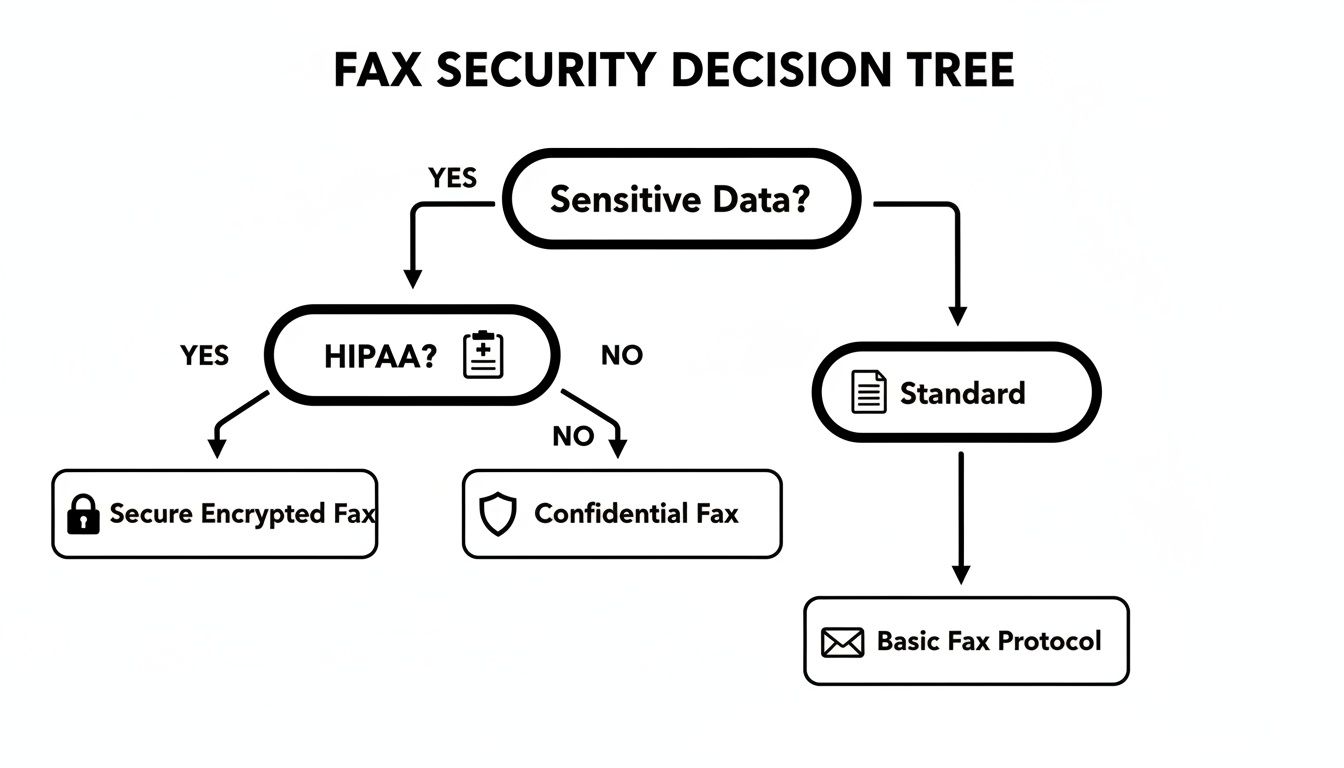
As you can see, the moment sensitive information enters the picture, compliance standards like HIPAA become a top priority. Choosing a service that isn't compliant isn't just a bad idea—it's a legal and financial risk.
Key enterprise features to look for include HIPAA compliance certifications, multi-user dashboards for team management, detailed audit trails for tracking document access, and API integrations that allow the fax service to connect directly with your existing software, such as an Electronic Health Record (EHR) system. These capabilities are non-negotiable for maintaining security and operational efficiency at scale.
Common Questions About Digital Faxing Answered
Whenever you switch up a familiar process, a few questions are bound to pop up. This is especially true when you're dealing with official documents and need to be absolutely sure everything is handled correctly. Let's tackle some of the most common questions we hear from folks new to faxing without an actual machine.
My goal here is to give you clear, straightforward answers so you can feel confident from the start.
Is It Legal to Send Contracts and Medical Records This Way?
Yes, it's completely legal. In fact, when you use a reputable service, it’s often more secure than that old machine sitting in the corner of the office. Professional online fax services are built with security as a top priority, using strong encryption to shield your documents while they're in transit.
For industries with strict privacy rules, like healthcare, many top-tier services are designed to be HIPAA compliant. This ensures that sensitive information is handled legally and safely, providing a much better safeguard than a shared office machine that might leave confidential papers sitting out for anyone to see.
How Do I Know My Fax Actually Went Through?
This is one of the best parts about going digital. You get a clear answer almost immediately with an automated email confirmation. Moments after your fax is sent, a detailed report lands right in your inbox.
This digital receipt gives you everything you need to know:
- The exact time and date of the transmission.
- The total number of pages successfully sent.
- A clear "Success" or "Failed" status.
This confirmation acts as a reliable, digital paper trail. You can easily save it for your records or print it if you ever need a hard copy. No more hovering over the machine, wondering if the document made it to the other side.
Expert Insight: Traditional fax machines often spit out confusing error codes. Online delivery reports, on the other hand, are designed for clarity. If a fax fails, you'll usually get a simple reason, like "busy signal" or "invalid number," so you know exactly what went wrong and how to fix it.
Can I Also Receive Faxes Without a Machine?
You bet. Most subscription-based online fax services will give you your own dedicated fax number. When someone sends a document to that number—from any fax machine, new or old—the service catches it and converts it into a PDF file.
That PDF is then sent directly to your email inbox. From there, you can open, download, and store your faxes just like any other attachment. It’s a seamless way to manage all your incoming documents right from your computer or phone, no hardware required.
Ready to send your first fax without the machine-related headaches? Give SendItFax a try for a simple, secure way to deliver your documents without needing an account. Send your fax now.
Related Posts

How to Fax from Computer Mac: Free Online Method

Do You Need a Fax Number to Send a Fax? a Practical Guide
