Creating the Perfect Generic Fax Cover Sheet
Think of a fax cover sheet as the professional handshake before the conversation begins. It’s the first page of your transmission, and it tells the recipient everything they need to know right away: who it's from, who it's for, and what it’s about. It's not just a formality; it’s a crucial step that makes sure your documents land on the right desk and get the attention they deserve.
Anatomy Of A Professional Fax Cover Sheet
In a busy office with a shared fax machine, a document without a cover sheet is an orphan. It could get lost, ignored, or seen by the wrong eyes. This is especially true in fields like healthcare and law, where a properly filled-out cover sheet isn't just a good idea—it's a critical piece of the security and compliance puzzle.
And yes, people are still faxing. In fact, the global fax services market was valued at USD 3.3 billion in 2024 and is expected to hit USD 4.47 billion by 2030. This isn't some dusty, forgotten technology; it's a core business tool. You can dive deeper into the fax services market growth on arizton.com. That ongoing relevance means professional standards, like using a cover sheet, matter more than ever.
Core Components Everyone Needs
No matter how simple or complex your fax is, every cover sheet needs a few non-negotiable pieces of information. Getting these basics right is what separates a professional communication from a potential headache for the recipient.
- Sender & Recipient Information: Be crystal clear. Include full names, companies, and direct fax numbers.
- Date: This is essential for record-keeping and creates an official timeline for your communication.
- Page Count: Always include the total number of pages, including the cover sheet itself. This is the single best way for the recipient to know if they received the entire transmission.
- Subject Line: A quick, descriptive subject gives the recipient immediate context before they even flip to the first page.
A well-structured cover sheet does more than just transmit information; it projects professionalism and shows respect for the recipient's time and internal processes. It’s the first step in a successful and secure document transfer.
Essential Fields for a Generic Fax Cover Sheet
To make it even clearer, here’s a quick breakdown of what to include on any standard fax cover sheet. Think of this table as your go-to checklist before you hit send.
| Field Name | Purpose | Example |
|---|---|---|
| To | Identifies the intended recipient's name and title. | Jane Doe, Accounts Payable Manager |
| From | Identifies the sender's name and title. | John Smith, Project Lead |
| Fax Number | Lists the recipient's and sender's fax numbers for contact. | Recipient: 555-123-4567, Sender: 555-987-6543 |
| Date | Records the date of transmission for tracking. | October 26, 2024 |
| Total Pages | Confirms the total number of pages sent, including the cover. | 5 (including cover sheet) |
| Subject/RE | Briefly describes the fax content for quick identification. | RE: Invoice #INV-7890 for Q3 Services |
| Comments | Provides space for brief notes, urgency, or confidentiality notices. | Urgent: Please process by EOD. |
Filling out these fields consistently ensures your faxes are always clear, professional, and directed to the right person without any guesswork.
How to Fill Out Your Cover Sheet Accurately
Filling out a fax cover sheet seems like a no-brainer, but I've seen simple mistakes cause major headaches. A single wrong digit in the fax number and your document goes nowhere. Miscount the pages, and the person on the other end is left wondering if the machine jammed halfway through. Getting these details right is the difference between a successful transmission and a failed one.
Let’s start at the top: the sender and recipient info. Always go with full names and company details. It sounds obvious, but you'd be surprised. When it comes to phone and fax numbers, stick to a consistent format like (555) 123-4567. This little bit of standardization just makes everything clearer and prevents someone from misdialing when they need to call you back.
The page count is another classic spot for errors. Here’s the key thing to remember: the total number of pages must include the cover sheet itself. So, if you have a four-page report to send, your total page count is 5. This immediately tells the recipient what to expect and lets them know if the transmission was complete.
Adding Clarity and Context
The subject line and comments section are where you can really help the person on the other end. A lazy subject like "Invoice" doesn't help anyone. Something specific, like "RE: Invoice #4521 – Final Payment Request," gets it to the right person's desk much faster.
This is also your chance to add crucial handling instructions.
- For urgent documents: A quick note like "Urgent: Action Required by 5 PM" or "Time-Sensitive Materials" ensures it doesn't get lost in a pile.
- For confidential info: This is non-negotiable, especially in fields like healthcare or law. You need a clear disclaimer.
A simple statement like, "Confidential: This fax is intended only for the named recipient and may contain legally privileged information," does more than just inform. It provides a layer of legal protection, notifying anyone who might see it by accident that they can't read or share it.
Taking an extra 30 seconds to add these details is crucial for compliance with regulations like HIPAA. It’s what turns a basic fax cover sheet into a professional and secure tool for communication.
Grab a Free Fax Cover Sheet Template
Why start from scratch when you don't have to? We've already done the heavy lifting and created a handful of professional, ready-to-use templates. Just grab the one that fits what you're sending, fill it in, and you're good to go.
Each template is clean, easy to read, and has all the essential fields already in place. We've designed a few different versions to make sure you look polished, no matter if you're sending a quick note or a formal legal document.
Pick the Right Template for the Job
You wouldn't use the same tone for every email, and the same goes for fax cover sheets. We have four options to cover the most common scenarios:
- Basic Template: This is your go-to for everyday faxes. It’s simple, clean, and perfect for general use when you just need to get the job done.
- Business Template: A step up from the basic, this one includes a spot for your company logo. It’s a great way to keep your branding consistent and professional.
- Legal Template: When sending sensitive legal documents, you need to be explicit about privacy. This template features a bold, impossible-to-miss confidentiality notice.
- Healthcare Template: Built with HIPAA compliance in mind, this template includes a clear disclaimer to help protect patient health information (PHI).
Before you hit send, it's always a good idea to give your cover sheet a final once-over. This quick visual guide points out the key details that matter most.
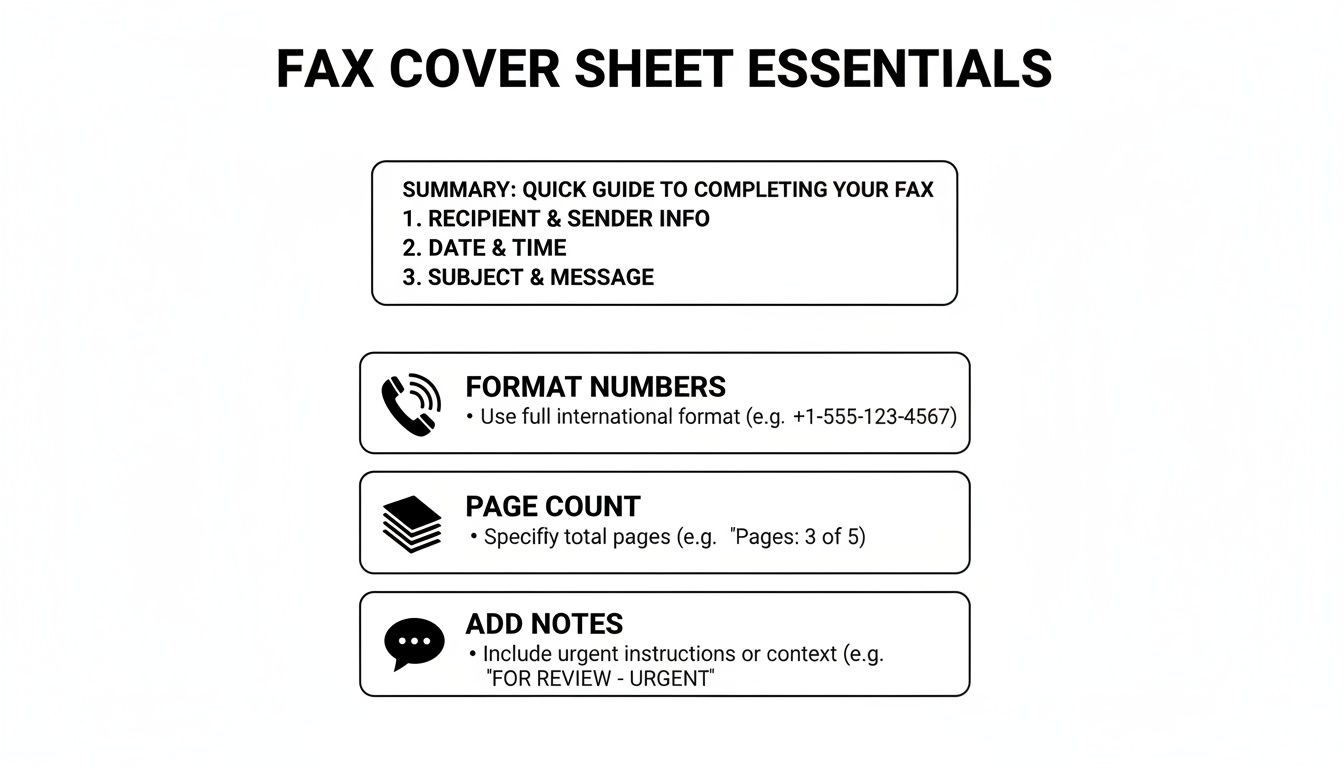
As the graphic shows, little things like double-checking the page count or ensuring the phone numbers are formatted correctly can make all the difference in a successful transmission.
Make a Template Your Own
After you download a template, feel free to tweak it. If you find yourself faxing the same client every week, why not save a version with their details already filled out? It’s a simple time-saver. For a deeper dive, check out our full guide on how to customize a fax cover sheet.
A good template does more than just save you a few minutes; it signals professionalism. A well-organized cover sheet shows you care about the details, which sets the right tone before your recipient even gets to the first page.
Using one of our templates is the fastest way to avoid common mistakes and ensure your fax makes the right first impression every time.
Common Faxing Mistakes You Can Easily Avoid
Even with the perfect cover sheet, simple slip-ups during the faxing process can cause major headaches. A contract sent to the wrong person or a medical file that cuts off halfway through can have real consequences.
Let's look at some of the most common—and easily fixable—mistakes I see people make all the time.
The Pesky Page Count
One of the most frequent flubs is getting the page count wrong. It sounds minor, but it matters. People often forget to include the cover sheet in their total. This leaves the person on the other end wondering if their machine jammed or if the transmission was incomplete, leading to wasted time with follow-up calls and confusion.
Always double-check that your total page number includes the cover sheet itself. It's a small detail that makes a big difference.
Readability is Everything
Another classic mistake is sending a document that’s a blurry, illegible mess. If you're scanning something with faint handwriting or low-contrast text, it’s not going to get any better after being transmitted over a fax line. What’s the point of sending it if no one can read it?
Before you hit send, do a quick preview. Make sure every word is crisp and clear, especially for signed agreements or detailed forms where every single detail is crucial.
Don't Skip the Confidentiality Notice
This one is huge. Forgetting to include a confidentiality notice, especially when you're sending sensitive information, is probably the most critical mistake you can make. It's an absolute must in fields like healthcare and legal.
Believe it or not, the healthcare industry alone was responsible for over 9 billion of the 17 billion faxes sent worldwide back in 2019. It’s a testament to the fact that faxing is still a workhorse technology, as detailed in this article on the endurance of fax technology in modern communication. When that much protected health information (PHI) is flying around, that little disclaimer is your first line of defense.
A clear confidentiality statement isn't just a suggestion; it's a vital layer of protection. It formally notifies any unintended recipient that the contents are private and legally privileged, instructing them not to read, copy, or distribute the information.
If you work in a medical field, getting this right is non-negotiable for staying compliant. To make sure your documents are up to snuff, check out our guide on creating a HIPAA-compliant fax cover sheet.
Avoiding these simple errors will help you build a reliable and secure faxing habit every single time.
Using Cover Sheets With Online Fax Services
Moving from a clunky machine to an online fax service makes sending documents a whole lot easier. It also changes how you deal with a generic fax cover sheet. Forget about printing a separate page—modern platforms like SendItFax build the cover sheet right into the sending process.
As you get your documents ready to send, you’ll usually see an option to add a cover page. This is where you can type your message directly into a text field. The service then automatically generates a clean, professional cover sheet using your sender and recipient details, which saves a ton of time.
This seamless process is a big part of why faxing is still so relevant. Believe it or not, a 2023 study found that 82% of companies in Germany still regularly use fax because it provides a verifiable delivery and a solid paper trail. If you're curious why it's still so popular, you can read about its role in international business on faxination.com.
Customization and Control
Online fax services also give you a level of flexibility you just don't get with an old-school machine. A free plan might include the provider's branding on the cover page, which is perfectly fine for occasional use. But for business communications, upgrading to a paid plan usually removes that branding for a more polished look.
The real advantage of online services is control. You can choose to add a detailed cover message for one fax and then decide to omit the cover sheet entirely for the next one, all with a single click.
This kind of on-the-fly control fits perfectly with modern workflows. You get all the security and formality of a traditional fax without being stuck in a rigid, one-size-fits-all process. If you’re just getting started with this approach, you can learn the basics of how to send a fax online and see for yourself how simple it is.
Answering Your Top Fax Cover Sheet Questions
Even once you get the hang of filling out a fax cover sheet, a few common questions always seem to pop up. Let's tackle some of the most frequent ones so you can send your next fax with total confidence.
A big one I hear all the time is, "Is a cover sheet legally required?" For most day-to-day business faxes, the answer is no—there isn't some universal law that says you have to use one. But when you're working in regulated fields like healthcare or law, using a cover sheet isn't just a good idea; it's a critical best practice for staying compliant.
Think about it from a healthcare perspective. A cover sheet with a HIPAA disclaimer is your first line of defense in protecting patient health information (PHI). It immediately alerts anyone who sees it that the contents are confidential, which is a massive part of maintaining security and preventing an accidental breach.
Can I Just Make My Own Cover Sheet?
You absolutely can, and you don't need any fancy software to do it. A simple document created in Microsoft Word or Google Docs will work just fine.
If you want to create your own, it's pretty straightforward:
- Start with a blank document and give it a clear, bold title at the top, like "Fax Cover Sheet" or "Facsimile Transmittal."
- Next, add the essential fields we've already covered: To, From, Date, Subject, and the Total Page count (don't forget to include the cover page itself in this number!).
- Make sure to leave a decent-sized section for comments or any special instructions.
- Finally, if you're sending anything sensitive, add a confidentiality notice at the bottom.
Just save this file as a template on your computer, and you’ve got a go-to cover sheet ready whenever you need one. It's a simple and completely free solution that gets the job done.
What Is a Confidentiality Notice, Anyway?
A confidentiality notice is that formal-looking paragraph you often see at the bottom of a cover sheet. Its job is to warn anyone who lays eyes on the fax that the information is private and meant only for the person it's addressed to. It's a legal safeguard that can be incredibly important if your fax ends up in the wrong hands.
This notice isn't just filler text; it’s a direct instruction. It clearly states that the information is privileged and that anyone who isn't the intended recipient is strictly prohibited from reading, copying, or sharing it.
You should always include one when you're faxing things like:
- Legal documents or signed contracts
- Medical records or any patient data
- Financial statements or personal information
- Internal company memos that aren't meant for public release
Here’s a classic example you can adapt for your own use:
"CONFIDENTIALITY NOTICE: The documents accompanying this transmission contain confidential information belonging to the sender that is legally privileged. This information is intended only for the use of the individual or entity named above. If you are not the intended recipient, you are hereby notified that any disclosure, copying, distribution, or action taken in reliance on the contents of this information is strictly prohibited."
Ready to send a fax without the fuss? SendItFax lets you upload your documents, add a professional cover page, and send your fax in minutes—no account or fax machine needed. Try it now at https://senditfax.com.
Related Posts

How to Fax from Computer Mac: Free Online Method

Do You Need a Fax Number to Send a Fax? a Practical Guide
