Email vs Fax: Security, Cost and When to Use Each
In 2025, 40% of U.S. hospitals often sent patient information by mail or fax, while 34% sometimes did so, according to a survey summarized by the Sacramento Bee and reported by FaxRadar. That's a useful correction to the idea that fax has disappeared. The practical email vs fax question isn't which technology is newer, but which channel reaches the right recipient with the controls and evidence your document needs.
Email vs Fax at a Glance
Neither email nor fax is automatically safer, cheaper, or legally accepted for your particular task. Choose according to the recipient's endpoint, the document's sensitivity, and the record you must retain.
Email and fax compared on the criteria that decide the choice
| Criterion | Fax | |
|---|---|---|
| Delivery speed | Usually quick, but filtering, file limits, and server problems can delay delivery | Transmission takes time; busy numbers and retries can delay completion |
| Default security posture | Transport encryption isn't the same as end-to-end content encryption | Conventional fax lacks equivalent cryptographic protection; receiving-device access matters |
| Delivery evidence | Delivery failures may generate bounces; read receipts aren't dependable acknowledgments | A transmission report records the destination and transmission result |
| Legal acceptance | Confirm that the recipient or filing instructions accept email and electronic signatures | Use when the applicable instructions accept or require fax |
| Cost per document | Usually negligible incremental sending cost after account setup | Equipment and line costs, or a browser service's free or paid allowance |
| Best fit | Collaboration, larger documents, and groups of recipients | Signed forms and records going to an established fax endpoint |
Acceptance of a signature and acceptance of a filing method are separate questions. Don't assume that an electronically signed contract makes ordinary email an accepted way to submit a court filing, agency form, or other controlled document.
Choose the endpoint before the technology
Email suits documents people need to discuss, revise, search, and circulate. A purchasing manager reviewing a draft agreement needs a usable attachment and a reply thread, not a paper image arriving at a shared machine.
Fax makes sense when the recipient gives you a fax number rather than an email address, or when their instructions specifically direct you to fax a completed form. A handwritten signature can travel as part of the page image, but that image doesn't independently establish who signed it.
The historical overlap helps explain today's mixed workflows: the history of email places Ray Tomlinson's first network email in 1971, with an estimated 16 million email users worldwide by the end of 1995, when fax was already established in business.
Hardware no longer decides the choice
A browser fax service removes the need to own a machine or maintain a dedicated telephone line. It doesn't remove the need to check recipient details, protect the uploaded document, or file the delivery record.
For an occasional sender, that changes the purchasing decision. You're choosing a delivery route for a document, not necessarily buying another piece of office equipment.
How Secure and Compliant Each Channel Really Is
Security and compliance belong to the complete workflow, not the label on the channel. An encrypted message sent to an unauthorized recipient is still a disclosure. A fax delivered successfully to an unattended communal tray is still exposed.
Email offers substantial technical controls when someone configures and maintains them. NIST's Guidelines on Electronic Mail Security describe SPF, DKIM, and DMARC for sending-domain authentication, TLS for SMTP connections, and S/MIME for message encryption and digital signatures; S/MIME or OpenPGP can protect content when keys and certificates are managed correctly.
Those controls solve different problems. Domain authentication doesn't verify that the person behind a destination address is authorized to receive a patient record, and transport encryption doesn't prevent an authorized mailbox user from forwarding an attachment. Treat unencrypted email as potentially readable and modifiable in transit.
Compare actual control coverage
Control coverage by channel
| Control | Fax | |
|---|---|---|
| Recipient authentication | Verify the destination separately; sending-domain authentication doesn't authenticate the recipient | Verify the number and identify who collects incoming documents |
| Encryption in transit | Enforce TLS where appropriate; use content encryption for stronger confidentiality | Conventional telephone fax doesn't provide equivalent end-to-end cryptographic protection |
| Encryption at rest | Configure mailbox, device, and archive protection | Protect machine storage, paper files, and any digital inbox |
| Content integrity and signing | S/MIME or OpenPGP can provide cryptographic signatures | A handwritten signature is an image, not cryptographic integrity protection |
| Access control | Multifactor authentication and role-based mailbox permissions | Restricted room access and controlled document collection |
| Audit trail | Message traces, access logs, and administrative records where available | Transmission reports and available device or service logs |
| Retention governance | Managed archives, deletion rules, and applicable holds | Controlled paper filing and documented digital-storage cleanup |
Conventional fax relies heavily on physical procedures. Someone must collect the pages, place them in the correct file, restrict access, and dispose of them under the organization's retention rules. A cover sheet identifies the intended recipient, but it doesn't stop another person from reading the pages underneath.
Regulated documents need a documented decision
HHS guidance on emailing electronic protected health information permits transmission over an open network when the covered entity implements appropriate access, integrity, and transmission safeguards, assesses risk, and documents its decision. Email isn't automatically prohibited, and choosing fax doesn't automatically establish compliance.
For patient records, use this HIPAA-compliant document-sharing guide to organize the questions your workflow must answer. Confirm the recipient's authority, appropriate service agreements, access restrictions, retention rules, and incident procedures before uploading sensitive material.
If neither ordinary email nor the receiving fax arrangement offers adequate controls, TOOLii's resource helps you compare SFTP and encrypted portals. These alternatives deserve consideration when you need controlled access to files rather than another copy circulating through inboxes.
A fax can contain only an attachment, only text, or both. Whichever you use, include only the information needed for the task.
Practical rule: Judge the channel by the controls you can demonstrate, not its reputation for security.
Where Each Channel Actually Fails
A fax can fail even when the sender enters a working number. If that number belongs to the wrong office, the machine may accept every page without warning you that the document reached a stranger.
Shared equipment creates another problem. Pages can sit in an output tray, remain in device memory, or reach a receiving system whose staff haven't printed or routed them. A successful transmission doesn't guarantee that someone has a complete, legible document in hand.
Delivery records aren't human acknowledgments
With our browser service, email notifications identify the stages queued, sending, delivered, or failed. You can track status in real time using the unique Fax ID.
Keep that identifier with the document's record. Once a fax is sent, it can't be recalled or cancelled, so a mistaken destination requires an incident response, not a search for an undo button.
Email has its own quiet failures. A mistyped address may belong to a real person, an automatic forwarding rule may send the attachment elsewhere, or a compromised mailbox may expose a message after otherwise successful delivery.
A bounce can help diagnose a delivery failure, but the absence of a bounce isn't proof of authorized receipt. Mailbeam's guide to bounce messages is useful when you need to distinguish an address problem from a temporary delivery issue.
A fax transmission report records delivery to a number, and email delivery records concern a mailbox. Neither proves the intended person read and understood the document.
Handle stalled transmissions without creating duplicates
A fax that remains queued for more than 20 minutes may indicate a technical issue. Check its status and destination before sending another copy, particularly when duplicate documents could trigger duplicate processing.
For an urgent submission, call the receiving office and ask someone to confirm the document's identity, completeness, and legibility. Don't ask only whether something arrived.
Use this pre-send check:
- Verify the destination: Compare every digit or address character against an authoritative contact record.
- Check the complete document: Open the final file and confirm its page count and attachments.
- Assign the record: Decide where the confirmation will be filed and who will follow up.
- Check urgency: Leave time to investigate a failure rather than transmitting at the last possible moment.
What Each Option Costs to Run
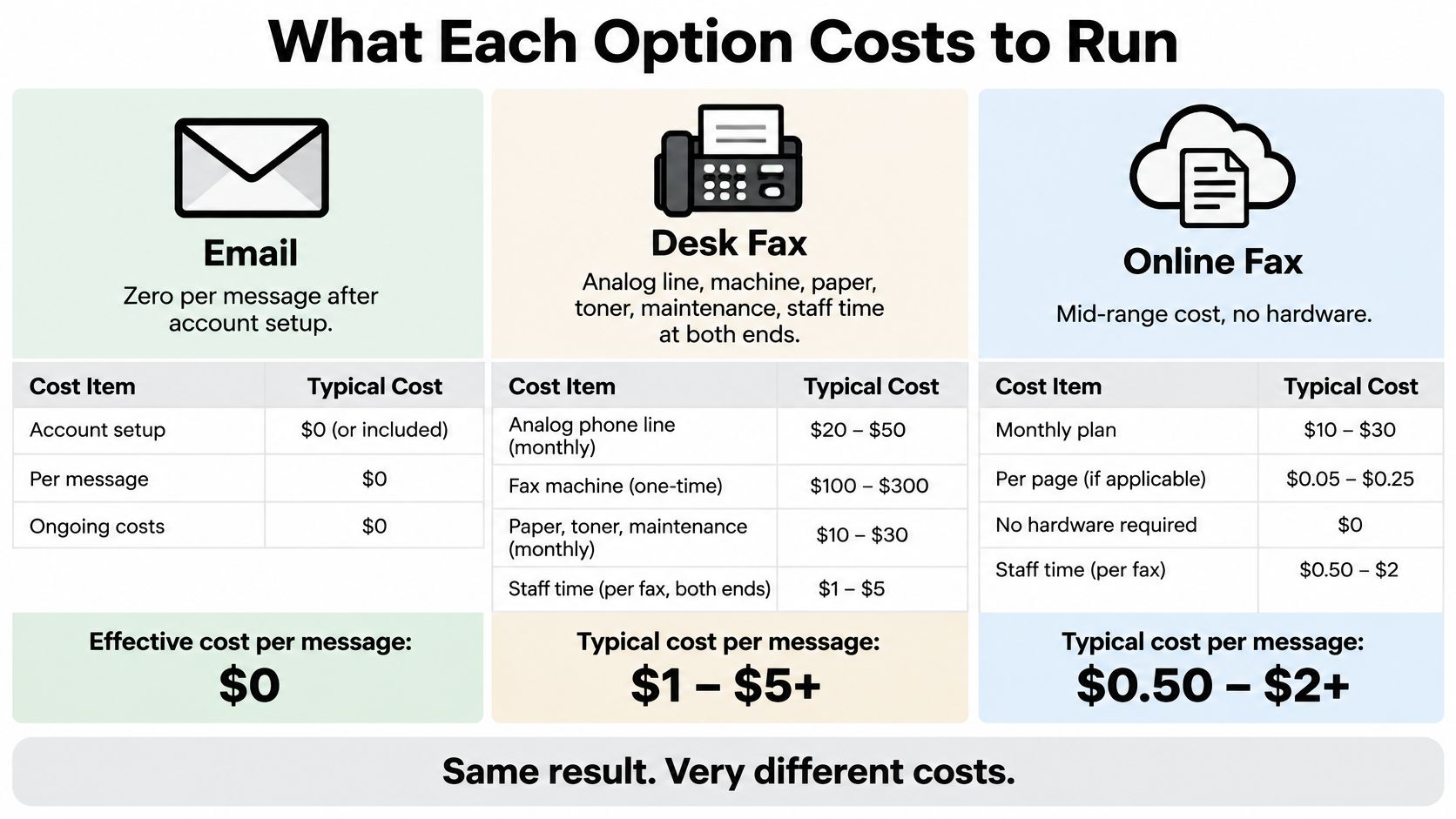
Email usually has negligible incremental cost per message once an account exists. That doesn't make secure business email free: account administration, archiving, access management, and staff time still belong in the budget.
A desk fax adds a telephone connection, equipment, paper, toner, maintenance, and handling at both ends. Browser faxing removes the local machine and line, replacing those expenses with a service allowance or transaction charge.
At SendItFax, a priority fax costs $1.99, supports up to 25 pages, and includes priority delivery without branding. There's no subscription or recurring charge, and priority sending has no daily limit.
Compare the actual monthly workload
Monthly cost at three fax volumes
| Volume | Own fax machine | Our browser fax option | |
|---|---|---|---|
| 2 faxes a month | Telephone connection, machine, paper, toner, and maintenance | Negligible incremental sending cost if accepted | $3.98 using priority sending |
| 10 faxes a month | Same fixed expenses plus consumables and handling | Negligible incremental sending cost if accepted | $19.90 using priority sending |
| Under 3 pages, up to 5 a day | Machine and connection still required | Suitable only if the recipient accepts email | Free within the free-service limits |
For a hypothetical month containing 30 priority faxes, the transaction total would be $59.70. A subscription becomes financially attractive only when its allowance covers your workload for less than your transaction total, after accounting for any overage charges.
The free option covers up to three document pages plus a cover page, allows five free faxes daily, and includes our branding. It isn't a trial and doesn't convert into a paid plan.
The main cost categories are summarized below.
Include the work around the send
Email's broad availability explains why it's usually the economical starting point when recipients accept it. EmailTooltester estimates approximately 4.73 billion email users worldwide in 2026, although that reach doesn't establish whether a particular recipient accepts sensitive documents by email.
Use our fax-service cost guide to compare the billing model against your sending pattern. Occasional bursts and steady daily traffic can justify different choices.
Also price the work nobody puts on the invoice: checking destinations, fixing unreadable scans, investigating failures, and filing confirmations. Avoiding a mistaken send is often more valuable than shaving a small amount from the transmission charge.
Use Cases Where Each Channel Wins
Hospitals' continued use of mail and fax reflects a basic operational constraint: senders must work with the receiving organization's intake process. An email attachment won't help if the practice routes incoming records through a fax queue that its records staff monitor.
The same principle applies outside healthcare. Start with the submission instructions, then choose the channel and evidence that fit them.
Which channel fits which document request
| Situation | Better channel | Why |
|---|---|---|
| Signed client contract with a reachable email address | Email with an accepted e-signature process | Supports review, signing, and return without printing |
| Court filing or agency submission whose instructions name a fax number | Fax, if those instructions authorize it | Matches the specified submission route; retain the required confirmation |
| Patient records to a practice that receives by fax | Approved fax workflow or accepted secure portal | Fits the practice's intake while allowing necessary safeguards |
| Long report for several colleagues | Email or an approved document-sharing link | Supports distribution, discussion, and a searchable record |
| Tax documents on a filing deadline | The method specified for that particular document | A general fax number doesn't establish that the filing is accepted |
| Real estate offer with a hard deadline | Fax or email with an accepted signing process | The receiving broker's instructions and acknowledgment determine the choice |
Regulated intake needs a receiving owner
For healthcare, legal, and other controlled records, identify the person or team responsible for intake. Ask how they associate the incoming document with the correct patient, matter, or application.
Fax's advantage is compatibility with an established receiving process. Its trade-off is that a transmission record may still leave you needing a separate acknowledgment from the person responsible for action.
Email's advantage is convenient coordination across a group. Its trade-off is that distribution can expand easily while reliable acknowledgment remains a separate task.
Working drafts and final records need different handling
Email suits comments, revised wording, scheduling, and questions that benefit from a conversation. Use clear filenames and identify the current draft so colleagues don't edit different versions unknowingly.
A mixed workflow can also work: circulate the draft digitally, then send the completed signed document through the recipient's designated final-submission channel. Keep the submitted version distinct from the working draft, and attach its delivery evidence to the same case or transaction record.
Don't fax only a signature page unless the recipient accepts that arrangement and can unambiguously associate it with the complete agreement. Otherwise, send the full final document.
Fax wins when the accepted endpoint is a fax number. Email wins when the task is a conversation with people who work in email.
Pick the Right Channel for Your Next Document
Use these questions in order. They separate a recipient's mandatory instructions from your own preferences about convenience.
Does the recipient or filing rule require fax?
Use the specified fax route and follow its submission instructions. Verify any deadline, cover-sheet requirements, and acknowledgment procedure directly with the receiving authority.Does the recipient need a signed page image and a transmission record?
Fax may fit, provided the recipient accepts it. Don't confuse preservation of the page's appearance with independent verification of the signer's identity.Is the task discussion, group coordination, or circulation of a long document?
Choose email or your organization's approved sharing tool when recipients already use it. Keep the authoritative version somewhere more controlled than a sprawling reply chain.Is the content regulated or especially sensitive?
Use only a workflow whose safeguards and agreements meet your obligations. If ordinary email can't meet them, use an approved secure portal or a properly controlled fax process rather than improvising.
Resolve the awkward middle cases
Suppose a client wants revisions by email but requires the executed agreement by fax. Keep the discussion in email, export the agreed final document, and transmit that version through the accepted endpoint.
For a deadline, priority delivery is a service preference, not a guarantee of recipient action. Leave time for the recipient to identify missing pages, request a correction, or acknowledge acceptance.
Our browser service is intended for occasional document sending without buying hardware or opening an account. It can be useful for an urgent contract or form, but it doesn't replace checking the recipient's requirements before you upload.
Prepare the document before opening the form
Create a readable final file, remove unrelated pages, and give it a filename you'll recognize in your records. Put the recipient's verified number beside the file rather than relying on memory or an old message thread.
If the request seems unusual, confirm it through a trusted contact channel. A convincing email asking you to fax records to a new number deserves the same scrutiny as a request to send them to a new email address.
The remaining job is execution: enter the details carefully, submit the intended file, and retain the result.
How to Send a Fax From Your Browser
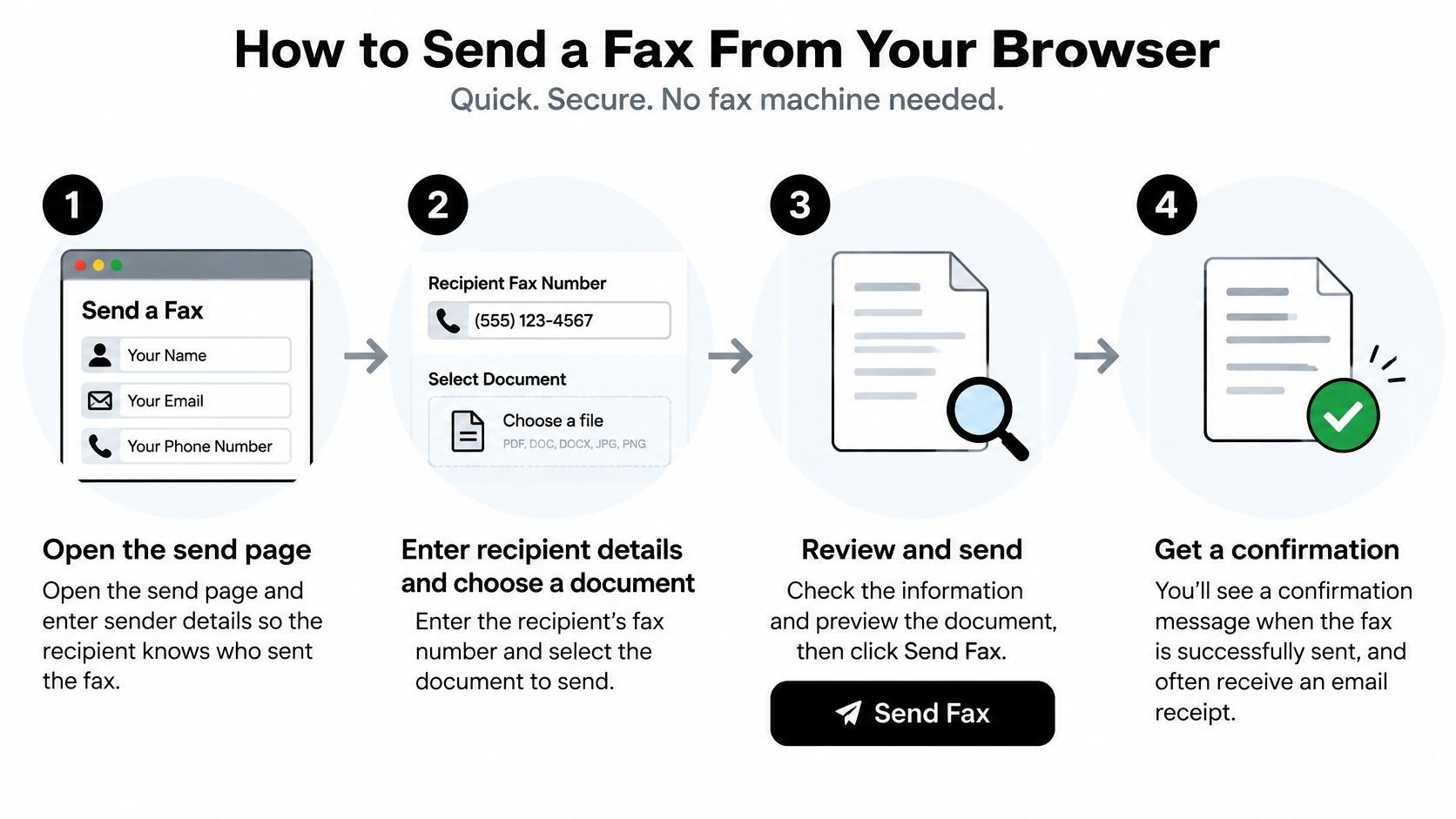
You can use our form from a computer, tablet, or phone, without downloads, installations, or an account. Sending a first fax takes less than two minutes to submit, but that isn't a promise that transmission or recipient processing will finish in that time.
The visual below summarizes browser-based sending.
Complete the form and preserve the result
Enter your sender information.
Use details the recipient will recognize, and check your email address because status updates go there.Enter the receiver's name and full fax number.
Include the country code and check the digits twice against the verified destination; our service sends to U.S. and Canadian numbers.Upload the document as DOC, DOCX, or PDF.
Multiple files can travel in one transmission, but upload them together before sending so the intended set is combined.Add an optional cover-page message.
Identify the document and intended recipient without adding unnecessary sensitive details, and state the expected document page count.Complete the CAPTCHA.
Finish this check before trying to submit the form.Review the details and send.
For the free option, click Send Free Fax Now only after checking the destination and selected files, because submission can't be recalled.Check the confirmation email.
Match the Fax ID, recipient number, page count, timestamp, and delivery status to your intended transmission, then save the confirmation with the document.
Our guide to sending a fax from the web provides another reference while you complete the form. Keep the original final file as well as the confirmation so your records show both what you submitted and the reported outcome.
For a visual walkthrough of the sending process, use the demonstration below.
Investigate before trying again
If the status stalls, inspect the destination's number format and use the Fax ID when contacting support. Don't repeatedly submit the same document while an earlier transmission remains unresolved.
If the service reports delivery but the recipient can't locate the document, ask their intake staff to check the receiving queue or machine. Resolve that mismatch before assuming another transmission is the right fix.
SendItFax lets you send documents to U.S. and Canadian fax numbers from your browser without a machine or account, with free and pay-per-fax options. If fax is the recipient's accepted channel, prepare your final document, verify the number, and visit SendItFax to submit it and track the delivery result.
Related Posts
Test Fax Line Guide: Run, Read and Fix Results
Test Fax Page: Free Template and Step-by-Step Checks